
You asked three people where the offsite notes from last quarter are. One person sent a Google Doc. One sent a Slack thread from five months ago. One sent a spreadsheet with seventeen tabs.
Somewhere in those seventeen tabs is the venue contract. Probably.
This is how most companies actually manage events - not with software, but with a patchwork of files, forwarded emails, and heroic planners who hold the whole thing in their heads because that's faster than explaining it to a tool that doesn't understand what they actually need.
That's the real problem event management software is supposed to solve. Not just ticketing. Not just registration. The whole thing: sourcing, logistics, budget, vendor coordination, guest communication - from the first idea to the post-event debrief - without making the planner do more work to keep the software updated than it would take to just handle it manually.
This article compares seven platforms that address that problem in different ways: BoomPop, Cvent, Teamout, Whova, SpotMe, vFairs, and Eventbrite.
What event management software should actually do
Event management software is a platform that handles the operational complexity of planning and running events: venue and vendor sourcing, registration and guest communication, budget tracking, on-site logistics, and post-event reporting, in a system your whole team can use without it becoming another thing to maintain.
The gap between what most platforms promise and what they deliver tends to show up the same way every time. The tool handles the clean, linear part of the process - registration, ticketing, a guest list - but falls apart when reality hits: a hotel that ghosts your RFP, a dietary restriction that slipped through the form, a budget that keeps shifting because every vendor quotes differently.
Good event management software doesn't just organize the information. It makes the chaos manageable for the person running it.
Who actually needs event management software
The teams that feel this pain most sharply share a few patterns:
You're past the spreadsheet threshold. One or two small events a year can survive on spreadsheets. Once you're running multiple events, managing group travel, or dealing with hotel RFPs, the spreadsheet breaks down fast - not because it's the wrong tool, but because the work is genuinely too interconnected for a static document to track.
Your planner is a one-person operation. Whether it's an EA, a people ops manager, or an "accidental planner" who got voluntold into the role, most event planning at growing companies falls on one person. When that person is also managing everything else, the margin for error is zero and the margin for breathable workflow is also basically zero.
Leadership wants ROI data you don't have. Budget pressure on events is real. When someone asks what the offsite cost per head, what vendors were used last time, or whether spending is on track, the answer shouldn't require digging through three different places.
Events are getting more complex. Team offsites, client dinners, conferences, incentive travel - the event mix at most companies isn't simpler than it used to be. It's more varied, and the expectation for quality keeps rising even when headcount stays flat.
How we evaluated these platforms
We compared these seven platforms against the criteria that actually predict whether the software gets used after the first event - not just whether it has a feature list that looks good in a demo.
The criteria that matter:
End-to-end workflow coverage: Does it handle sourcing and vendor coordination, or just the registration side? A platform that skips the hard part isn't solving the problem.
AI and automation for the manual work: Automated RFPs, AI-assisted itinerary building, and intelligent guest communication aren't nice-to-haves anymore. They're the difference between software that saves hours and software that creates them.
Planner experience, not just attendee experience: Most platforms optimize for what the attendee sees. The best ones care equally about what the planner deals with at 11pm the night before.
Budget visibility: Can you see where the money is at any given moment, without chasing down vendor invoices?
Integrations with how your team already works: Slack, HR systems, travel platforms, expense tools. If the event platform doesn't connect to anything else, it becomes an island.
The 7 best event management software platforms
1. BoomPop - best for companies that want smart, end-to-end event management without the chaos
Most event management tools were built to track events. BoomPop was built to run them.
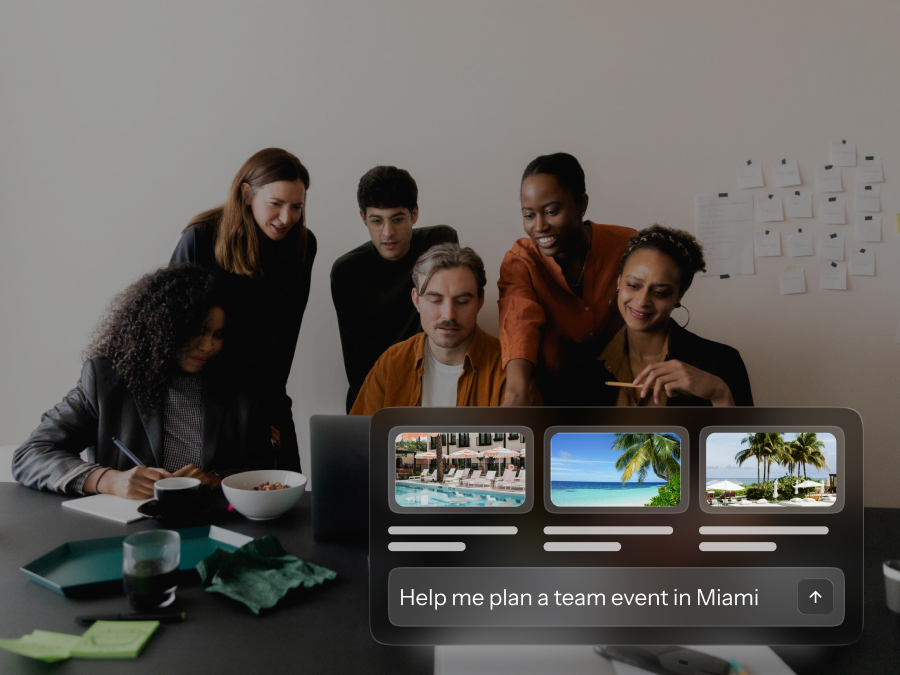
The difference is visible from the moment you start planning. Instead of opening a blank template, you describe what you want - "a 50-person team offsite within two hours of Austin in Q2, with outdoor activities and a budget of $1,500 per head" - and BoomPop's AI pulls from real-time data on venue pricing, availability, weather, and past event history to deliver fully designed event options. Not a list of links to chase. Actual options, down to the itinerary.
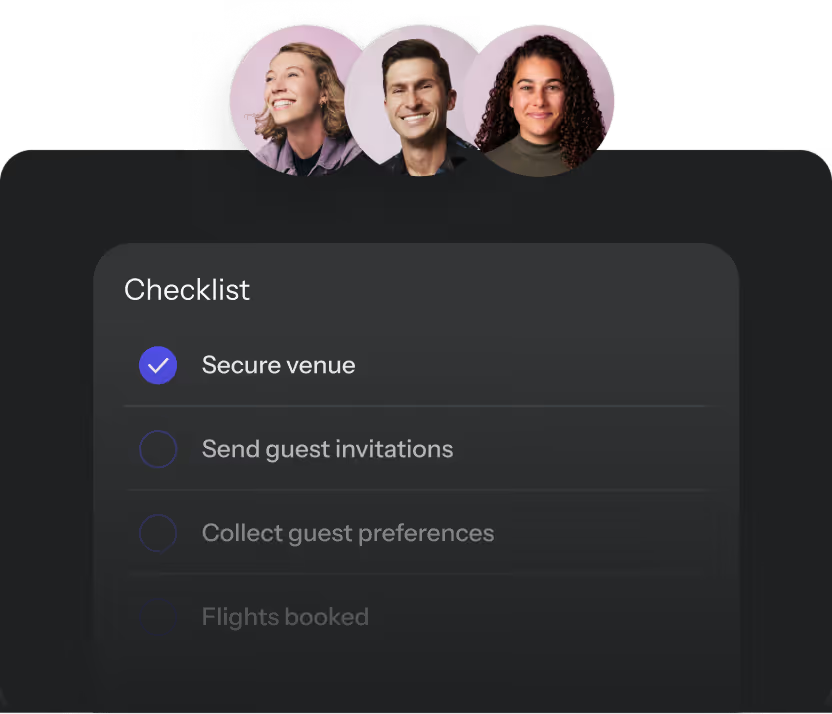
From there, everything lives in one place: vendor sourcing, automated RFP submission, contract review, guest website, RSVPs, dietary preferences, budget tracking, and post-event reporting. The AI handles guest communications directly via Slack or text, so the planner isn't fielding individual questions at all hours. Budget stays current as bookings come in, not after the fact.
This matters especially for the "accidental planner" - the EA or people ops manager who didn't sign up to become a full-time event coordinator but gets handed that responsibility anyway. BoomPop is specifically designed for that person: someone who needs the work to get done without becoming an expert in event logistics.
Key capabilities that set it apart:
- AI Itinerary Builder: Generates complete event options from a natural language prompt, grounded in real pricing and availability data
- Automated RFPs: Submits requests to venues and vendors automatically, tracks responses, and follows up - no more ghosting
- AI guest support: Fields attendee questions via text or Slack so the planner doesn't have to
- Live budget dashboard: Clean, running view of costs across all vendors with a shareable report
- BoomPop Studio: For teams that want full-service support, human event planners are available alongside the software - not as a separate vendor, but integrated into the same platform
- Proven network: 1M+ vetted venues and vendors, with clients including Google, Netflix, Dropbox, and Nike
BoomPop saves teams 25–40% on event costs and hundreds of hours per event, per their published benchmarks. It ranked #7 fastest-growing software company on the 2025 Inc. 5000.
Choose BoomPop when you need the full event workflow - not just registration or ticketing - and you want the software to do the heavy lifting instead of just tracking it. Avoid it if your primary need is a public-facing ticketing marketplace or a virtual-only events platform.
2. Cvent - good for large enterprises managing high-volume, complex conference programs
Cvent is the category's legacy leader and the obvious choice when complexity and scale are the primary requirements. It covers registration, venue sourcing, onsite check-in, mobile apps, and enterprise reporting in a platform built for organizations running dozens or hundreds of events annually.
The tradeoff is well-documented: Cvent is powerful and genuinely comprehensive, but it was built for procurement-grade complexity. Users on G2 consistently describe the interface as overwhelming, especially for teams new to the platform. One review puts it plainly: "It is not intuitive at all. There are a lot of instances where what you need to update is in the last possible tab you would imagine." Implementation takes months, not weeks, and the cost reflects that.
Cvent ranks #1 in ability to execute in the 2026 Gartner Magic Quadrant for Event Marketing and Management Platforms - a legitimate recognition. But "ability to execute" for a team of enterprise event managers running a global conference calendar is a different criterion than "usability for the planner running your annual sales kickoff."
Choose Cvent when you're running large-scale external conferences, need enterprise procurement workflows, or have a dedicated events team managing high event volume. Avoid it when speed, simplicity, or end-to-end offsite planning are the priority - the platform's power comes with a learning curve that smaller teams can't afford.
3. Teamout - good for lightweight team retreat planning without full event infrastructure
Teamout is built for one specific problem: helping teams find and book retreats without the overhead of a full event management platform. It focuses on destination and venue recommendations, making the discovery phase faster for smaller teams that don't need registration workflows or budget dashboards.
The scope is deliberately narrow. Teamout doesn't handle RFPs, vendor coordination, guest communications, or post-event reporting - it's a discovery and booking tool, not a planning platform. That's appropriate for its target user, but it means teams that outgrow the simplest use case quickly run into its ceiling.
Consider Teamout when you're a small team planning a straightforward retreat and primarily need help with destination discovery. Avoid it when you need to manage logistics, guest preferences, vendor relationships, or anything that happens after the venue is booked.
4. Whova - good for conference and trade show organizers focused on attendee engagement
Whova is purpose-built for conferences: speaker management, session scheduling, attendee networking, and live polling. Its conference app is frequently praised for being easy to navigate, and the speaker center - which automates bio collection, headshot uploads, and session details - removes a significant administrative burden for conference organizers.
The honest limitation: Whova optimizes for attendee experience more than planner experience. Reviewers note that the back end is better suited to event administrators than the attendees themselves, and the interface design gets consistent feedback for feeling dated. It also doesn't address venue sourcing, vendor management, or offsite logistics - if your event type is a conference, that's fine. If it's not, Whova isn't the right fit.
Consider Whova when you're running a multi-track conference or trade show and attendee engagement is your primary concern. Avoid it when your event type is a team offsite, corporate retreat, or anything that requires vendor sourcing and logistics coordination.
5. SpotMe - good for enterprise pharma and life sciences events requiring compliance
SpotMe has built a specific and defensible position: enterprise events in regulated industries, particularly life sciences and pharma, where compliance documentation, audit trails, and data security requirements create a different kind of complexity than most platforms are built for.
Its mobile app is well-regarded for live engagement - polling, Q&A, personalized session recommendations - and its CRM integrations with Salesforce, HubSpot, and Veeva are genuinely deep. The recent Gartner assessment dropped SpotMe from Challenger to Niche Player, flagging gaps in agenda management and the complexity introduced by its dual-brand approach.
Consider SpotMe when you're running enterprise events in life sciences, pharma, or other regulated industries where compliance and data security are non-negotiable. Avoid it when compliance isn't a primary requirement - the platform's complexity and cost are difficult to justify outside of that context.
6. vFairs - good for virtual and hybrid conferences at scale
vFairs has held its position in Gartner's Leaders quadrant, earning recognition for AI-driven attendee matchmaking, a mobile-first support assistant, and real-time analytics. Its 3D virtual venue capability is a genuine differentiator for organizations that want to replicate the feel of an in-person conference in a virtual format.
The tradeoff is complexity on the attendee side: reviewers note that signing in can be confusing, and the visual customization options feel limited relative to what the platform promises. vFairs is also primarily a virtual and hybrid event platform - it's not built for the kind of corporate offsite or team retreat planning that involves hotel sourcing, ground logistics, or vendor coordination.
Consider vFairs when your event format is virtual or hybrid and you need a mature platform with strong analytics and AI matchmaking. Avoid it when in-person logistics, vendor sourcing, or team travel are core parts of what you're planning.
7. Eventbrite - good for public-facing events with ticketing and discovery
Eventbrite is in a different category than the other platforms on this list, and it's worth saying that plainly. It's a ticketing and event discovery platform - excellent for concerts, community events, fundraisers, festivals, and any event where public discoverability and ticket sales are the primary operational needs.
Eventbrite has a transparent pricing model, a massive marketplace of event listings, and integrations with Mailchimp, Google Calendar, and Slack via Zapier. It doesn't do venue sourcing, vendor coordination, budget management, or anything related to the corporate event planning workflow. That's by design - it's built for a different buyer.
Consider Eventbrite when you're running a public-facing event and ticket sales plus discoverability are what you need. Avoid it when you're planning internal corporate events, offsites, or anything requiring end-to-end logistics management.
What actually separates useful from useless in event software
The sourcing problem most platforms skip
Every event that involves a venue crosses the same threshold: at some point, you can't just book it online. Hotels for group travel, conference venues, offsite locations - they all require an RFP, a negotiation, and usually several rounds of back-and-forth before you know what anything actually costs.
Most event platforms consider this someone else's problem. They'll help you manage the event once it's booked, but the process of finding, comparing, and securing a venue? That's still done manually, in email, in spreadsheets, through vendor contacts you've built up over years.
This is what BoomPop calls "Spreadsheet Sourcing Hell" - and it's a real operational problem that most software in this category doesn't solve. Automated RFPs, real-time venue pricing, and AI-assisted negotiation aren't features that differentiate BoomPop on a spec sheet. They're the reason teams that switch stop using spreadsheets.
The invisible labor problem
There's a reason event planning burns people out at a rate most leaders don't notice: the work is invisible until something goes wrong.
The planner tracking dietary restrictions across forty attendees, managing the vendor who confirmed twice and then went silent, making sure the AV setup note got to the right person at the venue - none of that shows up in the event summary. The event looks smooth from the outside because the planner made it look smooth. That work is real, it's constant, and most event platforms don't acknowledge it, let alone reduce it.
The best event management software isn't just a place to store information. It actively handles the work that used to fall to the planner. AI guest communication that fields attendee questions so the planner doesn't have to. Automated follow-ups to vendors who haven't responded. A live budget view that doesn't require chasing invoices. That's what "reducing the lift" actually looks like.
Budget visibility that doesn't require a spreadsheet
Event budgets are living documents. A venue quote changes after the site visit. The catering estimate didn't include service fees. The AV company has a minimum you didn't know about until the contract.
Most event platforms don't handle this well because it's genuinely hard - you'd need real-time connections to vendor quotes, contract data, and booking confirmations all feeding into a single number. The platforms that solve this (BoomPop's live budget dashboard is the clearest example) save finance teams significant time and give leadership the ROI visibility they keep asking for.
How to choose the right platform
Match the platform to your actual event type
The biggest mistake in event software selection is evaluating platforms against a generic "event management" use case when your actual event type has specific requirements that most platforms don't cover.
If your events are public-facing with ticket sales → Eventbrite. If they're large external conferences → Cvent or Whova depending on your attendee engagement priority. If they're in regulated industries → SpotMe. If they're virtual or hybrid at scale → vFairs. If they're corporate offsites, team retreats, or internal company events → BoomPop.
The accidental planner test
Ask yourself who is actually going to use this software. Not who owns the event program in theory - who is going to be in the platform at 9pm the Tuesday before the event.
If that person is a dedicated event manager with a team, Cvent's complexity is manageable. If that person is an EA, a people ops manager, or anyone who has other primary responsibilities, the platform needs to reduce their workload rather than add to it. That's a different selection criterion, and it rules out more platforms than most evaluations acknowledge.
What to ask in a demo that vendors don't want you to ask
- "Show me the sourcing workflow, not just registration." Most demos go straight to the guest-facing side because that's clean. The sourcing side is where the work actually lives.
- "What does the planner see when a vendor goes silent?" Ghosting is real. How the platform handles non-responses tells you a lot.
- "How long does it take to get to a complete budget view?" If the answer involves exporting to a spreadsheet, that's your answer.
- "Show me what the 'accidental planner' experience looks like." If there isn't a good answer to this, the platform was built for a buyer that isn't you.
FAQ
What's the difference between event management software and event ticketing software?
Ticketing software handles ticket sales, registration, and event discovery - it's built around the transaction of getting people to sign up or pay. Event management software handles the planning side: venue sourcing, vendor coordination, logistics, guest communication, and budget tracking. Eventbrite is a ticketing platform. BoomPop is an event management platform. Most teams need both, or a platform that covers both.
How long does it take to get up and running with event management software?
It depends heavily on the platform and the complexity of your events. Eventbrite can be live in an hour. Cvent implementation typically takes months. BoomPop is designed to get teams planning their first event within a week, with the most complex features (full vendor integration, AI guest support, budget reporting) coming online progressively as you use the platform.
Do I need event management software if I only do a few events a year?
That depends on the complexity of the events, not the frequency. One 75-person offsite that involves hotel sourcing, group travel, vendor coordination, and budget reporting is more complex than ten small internal meetings. If any of your events require managing logistics across multiple vendors and guests, software pays for itself in time saved on the first event.
What does AI actually do in event management software?
In the best implementations, AI does the work that used to require a human's time: generating itinerary options from a natural-language brief, submitting and tracking RFPs, fielding attendee questions, and flagging when a budget line is trending over. In most implementations, "AI" means a chatbot that answers FAQs and a recommendation engine that suggests popular venues. The difference is significant - ask specifically what the AI does in the workflow, not just what it can do in a demo.
How do I make the ROI case for event management software internally?
The two numbers that land best with finance and leadership: hours saved per event and cost savings on vendor spend. BoomPop clients report saving 25–40% on event costs through automated RFP negotiation and competitive vendor pricing. On the time side, the hours a planner spends on manual sourcing, vendor follow-up, and guest communication are usually easier to quantify than they seem - most planners can estimate them quickly when asked. Start there.
What about platforms not on this list - Bizzabo, Swoogo, Splash?
Bizzabo and Swoogo are strong options for B2B conference-heavy programs, particularly when marketing automation and sponsor ROI tracking are priorities. Splash is well-regarded for branded event experiences in field marketing. None of them address the full corporate event planning workflow the way BoomPop does, and none have the venue sourcing and offsite planning capabilities that matter most for internal team events.
Start planning in 2 minutes or less

.avif)

.svg)